
Maksu Buttons JavaScript SDK
Browser-based SDK for integrating Apple Pay, Google Pay,
and other wallet payment methods via the Maksu payment platform.
This SDK provides:
- Payment buttons rendering
- Shipping and tax callbacks
- Secure payment result handling
Intended for use by merchant web applications.
This SDK enables merchants to integrate wallet-based payments
(such as Apple Pay and Google Pay) using the Maksu VPOS platform.
It is designed to run entirely in the user’s browser while
maintaining strict security boundaries between the merchant,
the Maksu backend, and external payment service providers.
High-Level Payment Flow
The payment process consists of the following steps:
1. Payment Session Initialization
The merchant backend creates a payment session using the
Maksu VPOS API and returns the session payload to the browser.
2. SDK Initialization
The merchant checkout page initializes the Maksu Buttons SDK,
registers optional callback handlers (shipping, tax, result),
and enables the desired wallet buttons.
3. Dynamic Shipping and Tax Calculation (Optional)
If configured, the SDK invokes merchant-defined callbacks
to calculate shipping costs and applicable taxes based on
the user’s address or selected options.
4. Payment Execution
The user selects a wallet payment method and completes
authentication. The SDK communicates with the Maksu VPOS
backend, which performs authorization and any required
3-D Secure flows.
5. Result Delivery
The Maksu VPOS backend returns a cryptographically signed
payment result to the SDK, which forwards it to the
merchant-defined result callback in the browser.
6. Backend Verification and Order Finalization
The merchant backend verifies the signed response and
finalizes the order:
- Success → order is confirmed and fulfilled
- Failure or cancellation → appropriate error handling
Security and Design Principles
- No sensitive secret keys or data are exposed in the browser
- All payment results are cryptographically signed
- In transit CAVV encrypted
- Subtotal tampering protected
- Clear separation of responsibilities between:
- Merchant frontend
- Merchant backend
- Maksu VPOS backend
- External wallet providers and acquirers
- Wallet-agnostic design supporting multiple payment methods
Itended Audience
This SDK and its documentation are intended for:
- Merchant integration teams
- Payment service providers and technical partners
- Security reviewers and auditors
Maksu VPOS 3 – Buttons SDK Payment Flow diagram
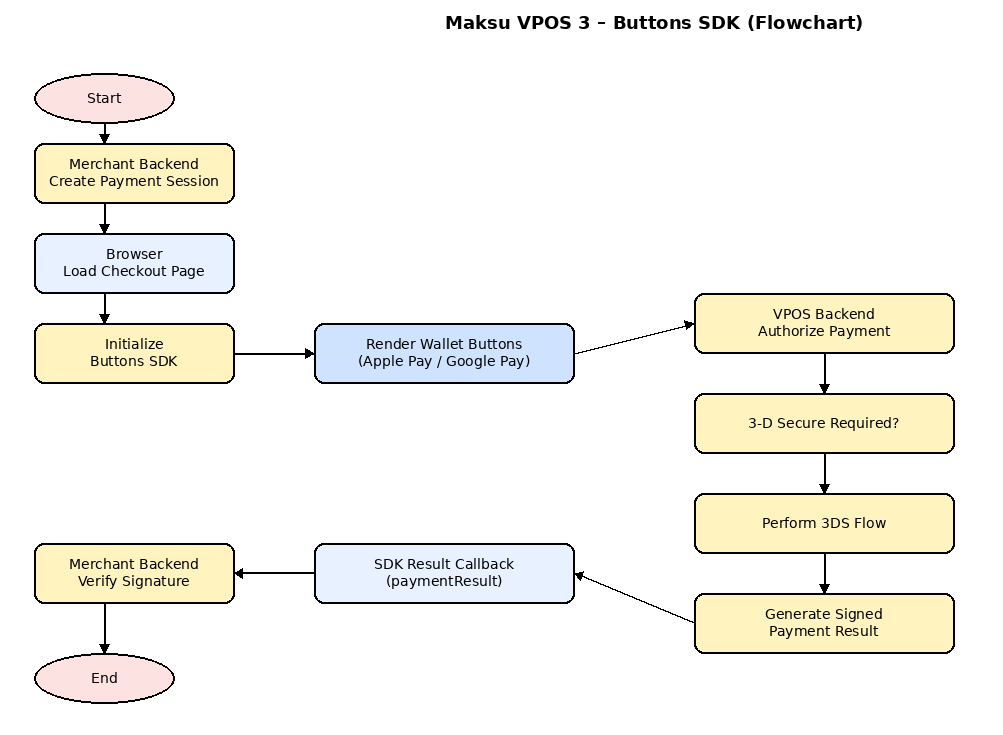 Also see PDF diagram
Example implemtation (demo)
Example implemtation js source
Also see PDF diagram
Example implemtation (demo)
Example implemtation js source
Also see PDF diagram
Example implemtation (demo)
Example implemtation js source